
This post is part of C# Advent 2025, for more event content click here.
Up until recently, developers that were working on an agentic solution using the Microsoft stack had 2 options to orchestrate their agents: Semantic Kernel and Autogen. Both solutions had their pros and cons which caused the search for a unified solution.
That solution came a couple months ago with the release of the Microsoft Agent Framework, the primary goal of this framework is to combine the best features of Semantic Kernel and Autogen to simplify agent orchestration. In this article, we will explore how to create an agent workflow using AI Foundry agents and Microsoft Agent Framework.
Workflow orchestrations.
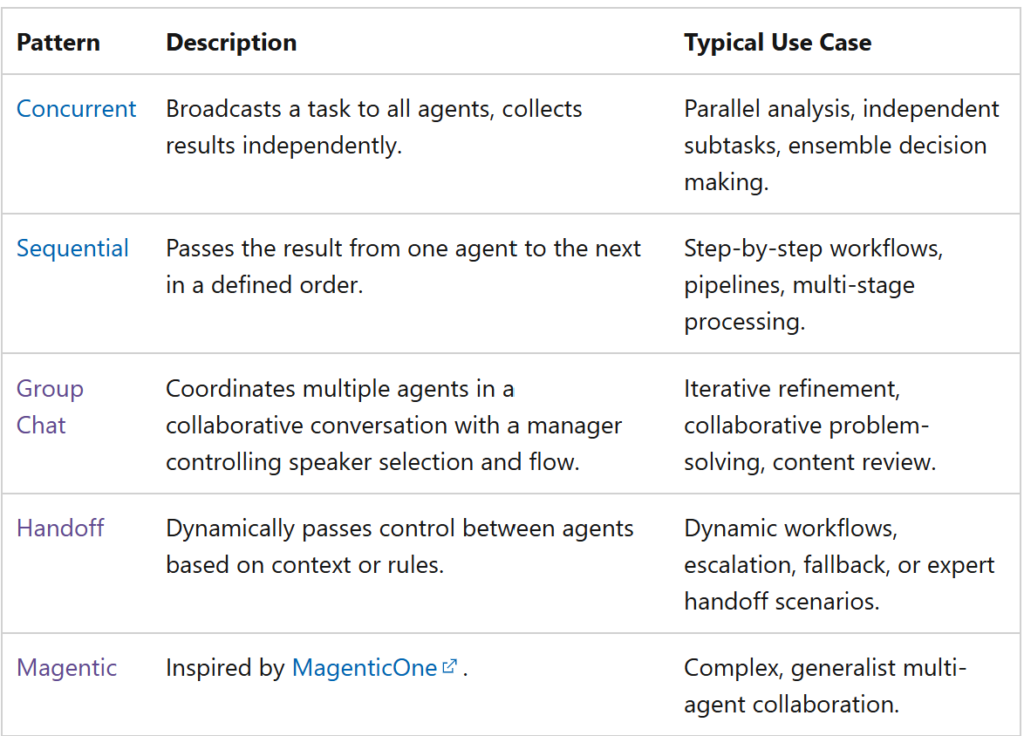
Orchestrations are pre-built workflow patterns that allow developers to quickly create complex workflows by simply plugging in their own AI agents, Microsoft Agent Framework supports the following orchestrations:
Building a restaurant assistant.
For our example, we will build a workflow with 3 agents that will help us find restaurant suggestions, our agents will have to determine whether they need to search for a new restaurant or pull from a list of restaurants that we have visited in the past based on the prompt. We will also have the ability to add restaurants to our list so they are available for searching.
We will being by creating our agents in Azure AI foundry, since our workflow will use a handoff orchestration we will need a triage agent (which will determine which agent needs to perform a task) and an 2 agents that will search for restaurants (one of them will do a web search and the other one will search in our custom list).
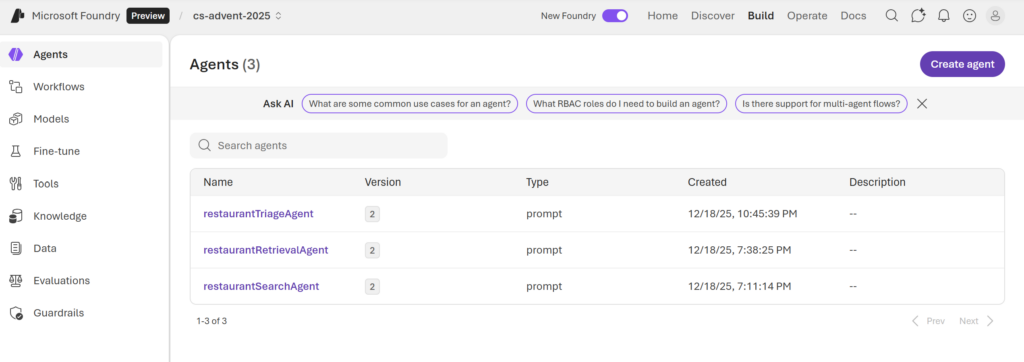
Now that our agents have been created we will use the Microsoft Agent Framework libraries to retrieve our agents:
#pragma warning disable OPENAI001

const string projectEndpoint = "YOUR FOUNDRY PROJECT URL";
const string restaurantRetrievalName = "restaurantRetrievalAgent";
const string restaurantSearchName = "restaurantSearchAgent";
const string restaurantTriageName = "restaurantTriageAgent";

// The AzureCliCredential will use your logged-in Azure CLI identity, make sure to run `az login` first
AIProjectClient projectClient = new(endpoint: new Uri(projectEndpoint), tokenProvider: new DefaultAzureCredential());

restaurantRetrievalAgent = projectClient.GetAIAgent(restaurantRetrievalName);
restaurantSearchAgent = projectClient.GetAIAgent(restaurantSearchName);
restaurantTriageAgent = projectClient.GetAIAgent(restaurantTriageName);
Now that we have our agents, we need to construct our workflow, which is made super easy thanks to the Agent Framework packages:
var workflow = AgentWorkflowBuilder.CreateHandoffBuilderWith(restaurantTriageAgent)
.WithHandoffs(restaurantTriageAgent, [restaurantRetrievalAgent, restaurantSearchAgent])
.WithHandoff(restaurantSearchAgent, restaurantTriageAgent)
.WithHandoff(restaurantRetrievalAgent, restaurantTriageAgent)
.Build();
In this code, we are first indicating that our triage agent is the starting point of our flow, next, we specify that the triage agent can do a handoff to any of the other agents and we finish by letting the workflow builder know that our worker agents can do a handoff to the triage agent.
Finally, we trigger the workflow by passing a message as an input and we process the output of the agents in a streaming fashion so we can update our interface accordingly:
await using StreamingRun run = await InProcessExecution.StreamAsync(workflow, input: "Find me a mexican restaurant that is within 30 minutes from home");
await foreach (WorkflowEvent evt in run.WatchStreamAsync())
{
    if (evt is WorkflowOutputEvent output)
    {
        messages.Add(new ChatMessage { Text = output.Data?.ToString(), IsOwnMessage = false });
    }
}
And that’s it! As you can see, it is super easy to create and orchestrate an agent workflow in C#, a word of warning though, this framework is only a couple months old and is changing very quickly so if you are using this to implement an agentic solution you need to make sure that you stay up to speed with the latest developments from the project team.
References.
- https://github.com/microsoft/agent-framework
- https://learn.microsoft.com/en-us/agent-framework/user-guide/workflows/orchestrations/overview
- https://learn.microsoft.com/en-us/azure/ai-foundry/quickstarts/get-started-code?view=foundry&tabs=csharp